
MapQuest has been around since it was online in the mid 90s. I remember printing out multi-page directions for a long trip and being amazed. Before that we had to look at paper maps and write directions down. MapQuest is still around and while they have an app they’re refreshingly old school. They recently made headlines for refusing to change the names of the Gulf of Mexico and Lake Ontario to the “America” variants Trump dictated. This seems like a no brainer, but of course Google, which no longer claims it’s not evil, bent over quickly.
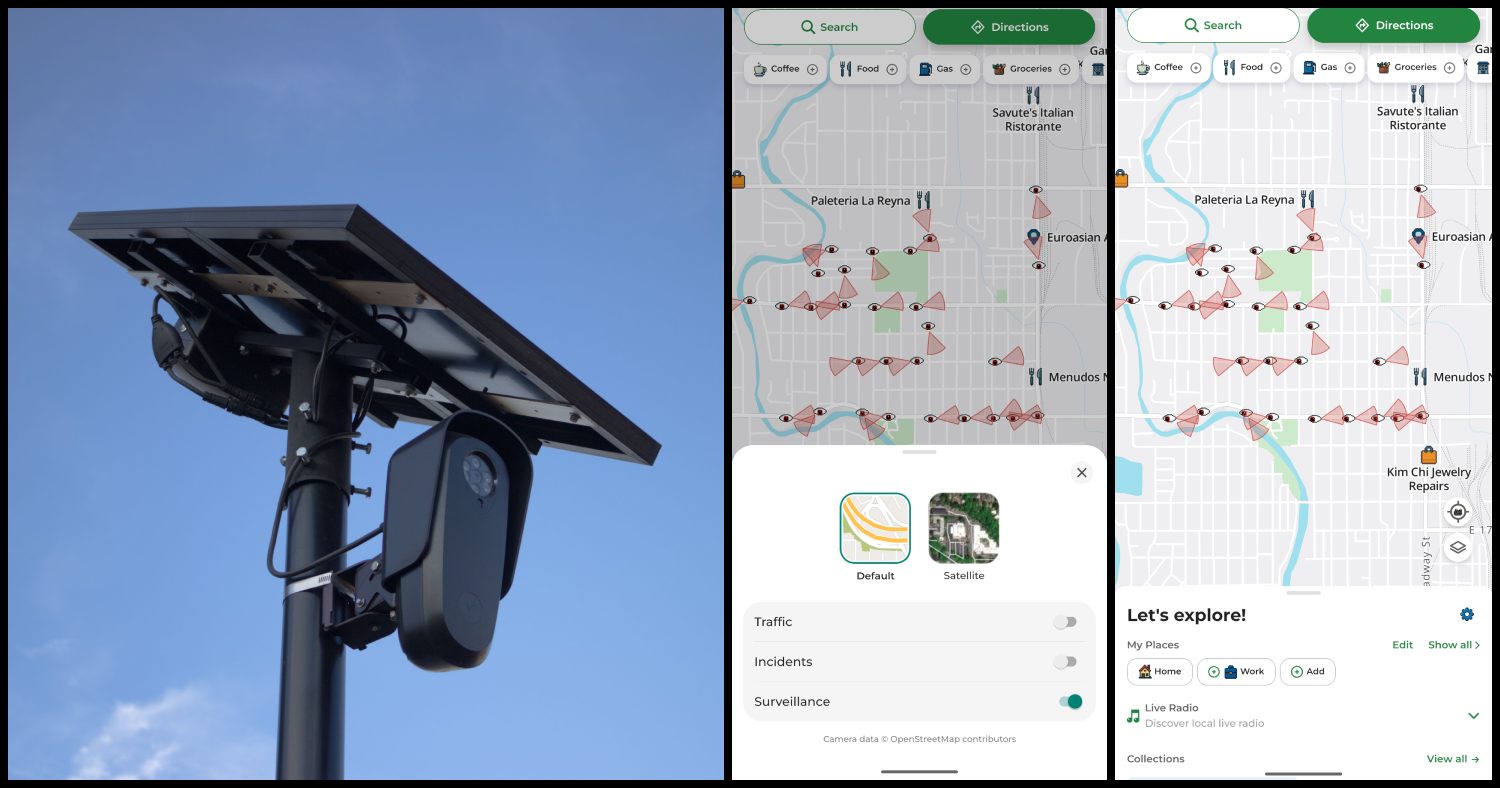
Now MapQuest is going one step further by added a special “surveillance layer” to its app. The company made an announcement on BlueSky that they now have the locations of license plate reader cameras by Flock, Motorola and more. To see cameras in your area you just turn this feature on. They even show which way the cameras are pointing. (Deflock.me has crowdsourced maps of license plate readers in the US. That’s likely where MapQuest got its data.)
I tried this out and I couldn’t get it to work at first. My son figured it out in about five seconds though. Once you’ve entered a destination you can’t choose this option. You have to be on the main page of the app in order to see the little layer icon in the lower right hand corner. From there you can toggle the “surveillance” option, which is beneath “traffic” and “incidents.” My only complaints are that you can’t see who manufactures the cameras and that you can’t plan your route around them. From what I understand Flock is especially egregious, but it might not matter that much. I know where the Flock cameras are in my city and I try to avoid them when I can. Now that I see the 30 other cameras on my regular routes I’m concerned.
It looks like I found a new app to replace Google Maps. I’d also like to complain about something – Google Maps sometimes adds sponsored links to the top of your search location results in the app. This means that if you’re not careful you can accidentally be sent to a random location. This has only happened to me once but it was maddening. MapQuest also has ads, but they’re clear and not misleading like this.
The Roads Have Eyes! ???
Turn on the Surveillance Layer in Map Options to see known license plate readers from Flock Safety, Motorola Solutions (Vigilant), Genetec, Axis Communications, Axon, Leonardo (ELSAG), Neology, Rekor, PlateSmart, Ubicquia, Verkada, and other outdoor surveillance cameras.
— MapQuest (@MapQuest.com) October 15, 2026 at 6:49 PM
Here is Josh Johnson talking about MapQuest. This is so true!











Commenting Guidelines
Read the article before commenting.
We aim to be a friendly, welcoming site where people can discuss entertainment stories and current events in a lighthearted, safe environment without fear of harassment, excessive negativity, or bullying. Different opinions, backgrounds, ages, and nationalities are welcome here - hatred and bigotry are not. If you make racist or bigoted remarks, comment under multiple names, or wish death on anyone you will be banned. There are no second chances if you violate one of these basic rules.
By commenting you agree to our comment policy and our privacy policy
Do not engage with trolls, contrarians or rude people. Comment "troll" and we will see it.
Please e-mail the moderators at cbcomments at gmail.com to delete a comment if it's offensive or spam. If your comment disappears, it may have been eaten by the spam filter. Please email us to get it retrieved.
You can sign up to get an image next to your name at Gravatar.com Thank you!
Leave a comment after you have read the article